I've switched reference managers twice, and neither time had anything to do with citations.
First one was Mendeley. After Elsevier bought it, every release felt a little heavier, until opening my own library felt like loading a web page on bad Wi-Fi. So I moved to Zotero — and honestly, it felt like the Mendeley I used to like years ago. Quick, plain, gets out of the way.
Then I hit the wall every Zotero user eventually hits.
Zotero fixed the interface, not the storage
Metadata — items, notes, tags, collections — syncs through Zotero's own servers for free, no limit. That part is genuinely generous. The problem is the attachments: PDFs, scanned books, web snapshots. Those come out of a 300 MB free quota, which isn't a lot of room for a library you've been collecting for years.
So you've got two options: buy more storage from Zotero, or use storage you already have somewhere else. Both are fine. I went with the second one, because the storage I already had was sitting right there.
The answer was already on my desk
My Obsidian vault lives in a private GitHub repo. Full history, and on a new machine I just clone it and I'm back. The notes are plain Markdown, so even if Obsidian vanished tomorrow, I could still read everything.
No reason my papers couldn't work the same way. So I wrote Zotero GitHub Sync — a Zotero plugin that pushes an entire library (metadata, notes, PDF annotations, collections, saved searches, tag colors, and the files themselves) into a GitHub repo of your choosing, private by default, as ordinary Git commits.
Download
This always downloads the newest .xpi — then Tools → Plugins → gear → Install Plugin From File…
⬇ Download .xpi
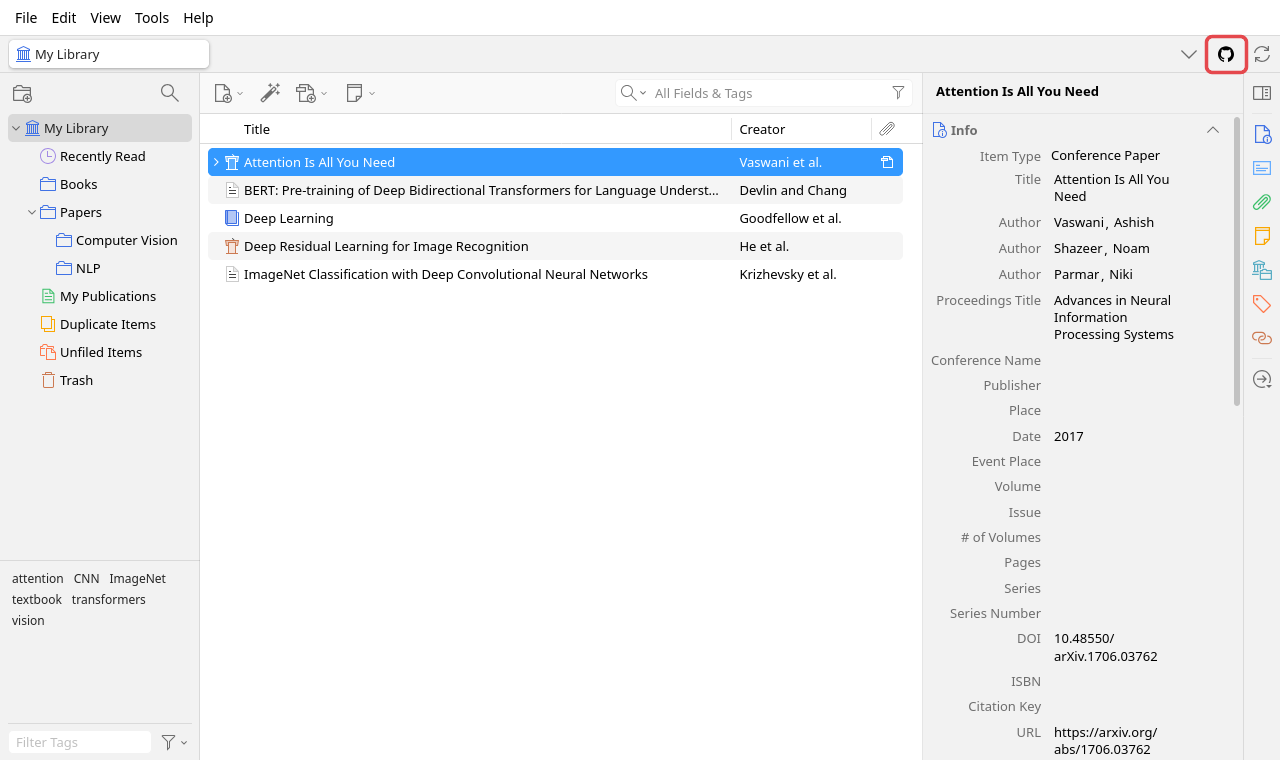
What actually lands in the repo
Everything shows up as something you can read without the plugin:
- Every item becomes a
JSON file — the Zotero API JSON, its children (notes, attachments, annotations), plus derived stuff like collection paths.
- Every note also becomes a Markdown file with YAML front matter: title, authors, DOI, tags, collections, and a
zotero:// link back. Which means the repo doubles as an Obsidian vault. That wasn't an accident.
- Attachment files go under
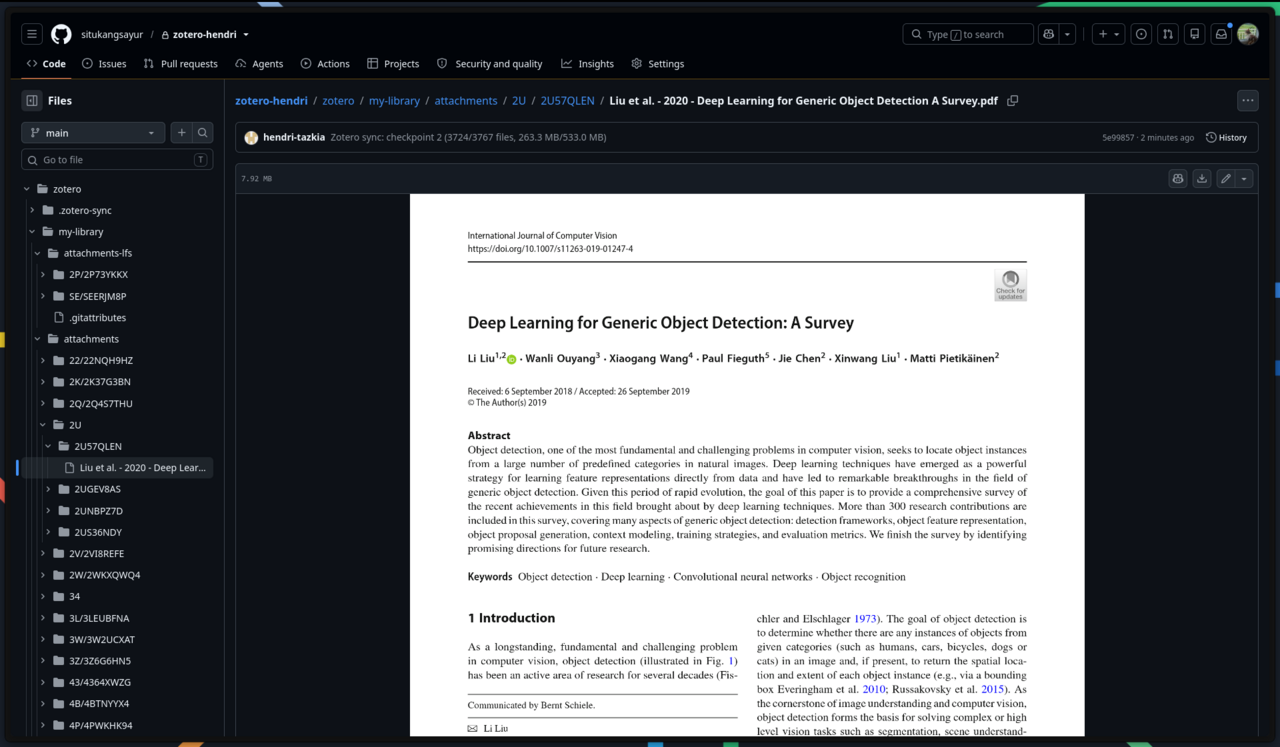
attachments/, split into subfolders by key — GitHub would rather you didn't put 3,000+ entries in one directory.
- PDF annotations (highlights, underlines, notes, image and ink) travel with their attachment and come back on import. So a highlight is still greppable years later, and it lands on the right page.
Setting it up — about ten minutes
New to all this? If "git", "GitHub" and "token" are three words you've only seen together in error messages, start with Git and GitHub, for people who keep files rather than code — it explains the whole thing from zero, then comes back here.
Make a repo. Private, and it can be completely empty; the plugin makes the first commit itself.
Then a fine-grained personal access token: Only select repositories → that one, and Repository permissions → Contents: Read and write. That's it. Contents already covers Git LFS. An SSH key won't work here, by the way — the plugin talks to GitHub's API, not to Git over SSH.
Never made one before? I wrote the whole thing up separately: making a GitHub token for Zotero GitHub Sync — every field, what to leave alone, and what each error means when it refuses.
Download the newest .xpi — in Firefox, right-click the link and pick Save Link As…, otherwise Firefox tries to install it as a browser extension. Then in Zotero: Tools → Plugins → gear → Install Plugin From File…, open Edit → Settings → GitHub Sync and paste the token. It goes into Zotero's password manager, not a plain-text prefs file.
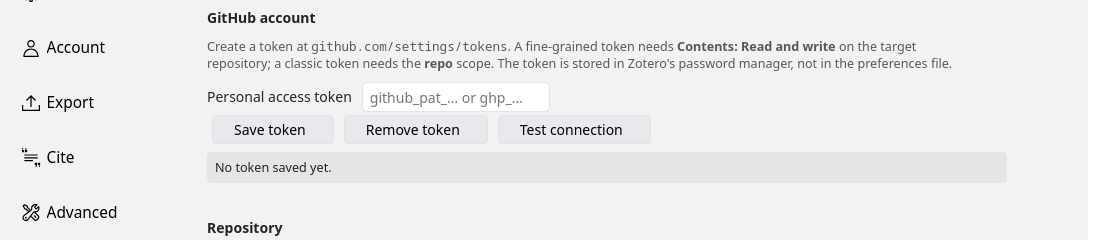
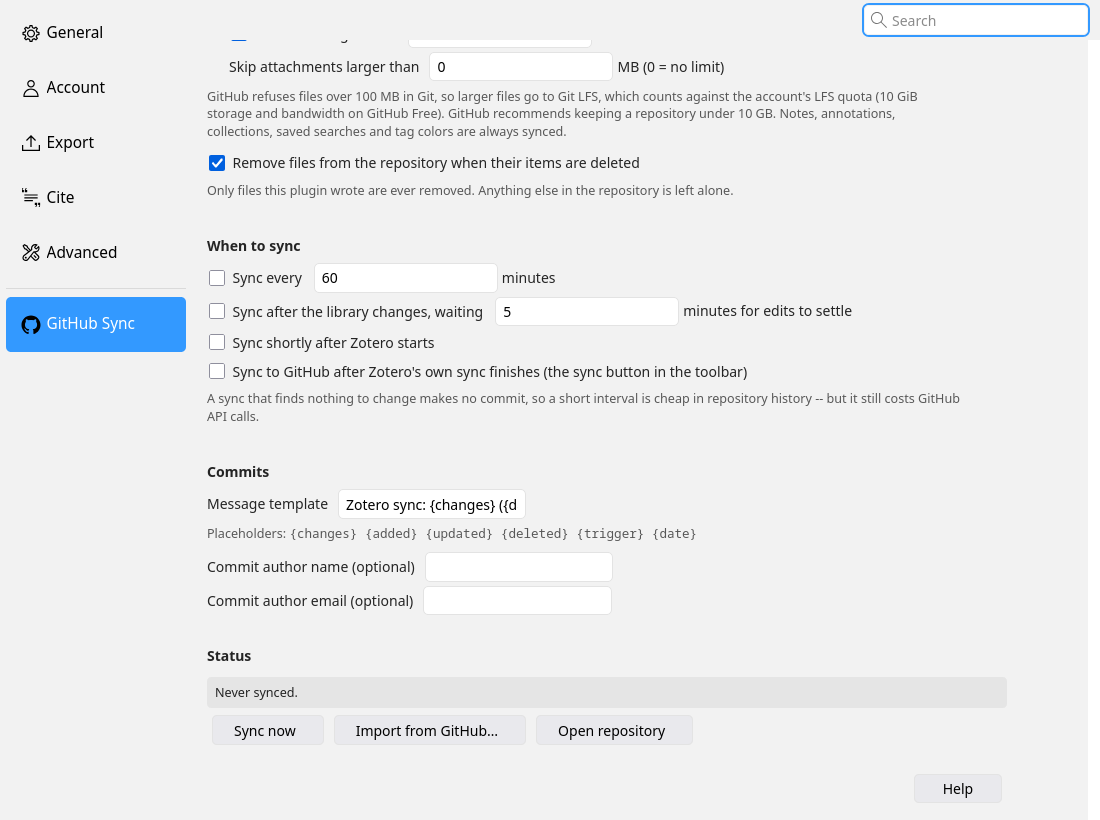
Fill in owner, repository, branch, and optionally a folder to keep everything under. Then hit Test connection before you trust it with anything — it tells you who the token authenticates as, whether the repo exists, and whether it can actually write there. Three different problems that otherwise look identical when your first sync fails.
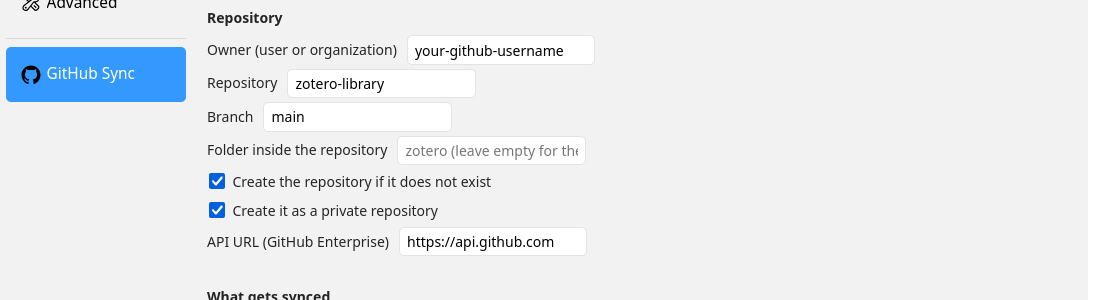
Everything syncs by default: metadata, Markdown notes, group libraries, attachment files, linked files. Anything over the threshold (50 MB by default) goes through Git LFS, because GitHub flat out refuses files over 100 MB in normal Git.
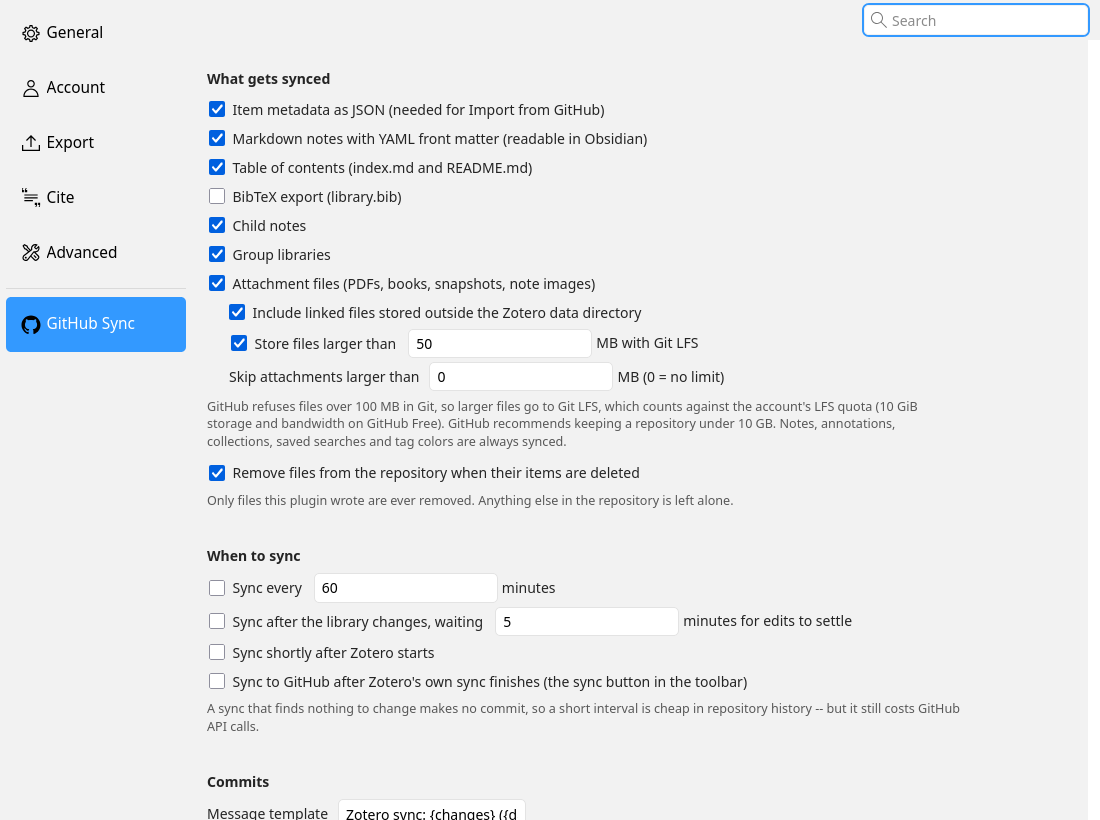
Then pick when it runs: on a timer, a few minutes after you stop editing, shortly after Zotero starts, or right after Zotero's own sync finishes. A sync that finds nothing new makes no commit, so running it often doesn't junk up your history.
One commit per sync, not one per file
The obvious way to write files to GitHub is the Contents API — one PUT per file. It's also the wrong way: one commit per file, one rate-limited request per file. A thousand-item library would mean thousands of commits, and you'd hit the rate limit before you finished.
So the plugin uses the Git Data API instead: blobs → tree → commit → move the ref. A hundred changed items is still one commit. And a sync where nothing changed costs three requests total, no matter how many PDFs you've got.
Determinism isn't tidiness, it's correctness
Exporting an unchanged library twice has to produce byte-identical files. If the export wobbles — a map iterated in a different order, a timestamp sneaking in — then every scheduled sync finds a "change" and commits it. On a five-minute timer that's 288 junk commits a day, and the history you were keeping for safety becomes unreadable.
So the export is deterministic by design, and the diff uses Git's own blob hash. Attachment hashes are computed in 4 MB chunks and cached by size and mtime — meaning after the first sync, an unchanged library isn't read from disk at all. Nothing gets loaded into memory except the one file being uploaded, and every uploaded blob's SHA is checked against the local hash before the commit happens.
A first sync you're allowed to interrupt
The first sync is the expensive one: everything gets hashed, big files go to LFS, and then the bytes have to actually travel. While it runs, the toolbar button shows a percentage, and clicking it opens a progress window.
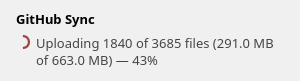
Two things make that survivable. Metadata and notes get committed first, in a handful of requests, so the readable half of your library is on GitHub within a minute or two. Attachment files then follow in checkpoints — every 100 MB or 150 files. Cancel it, lose your connection, close Zotero: whatever was committed stays, and the next sync picks up where it stopped. GitHub also caps how fast an account can create content; when the plugin hits that, it waits and tells you until when instead of failing.
When it's done, the repo holds your library — and since it's just files in Git, GitHub itself becomes a reader for it.
It only deletes what it wrote
A backup tool that can delete is a backup tool that can ruin your day. Every sync writes .zotero-sync/files.json — the sorted list of every path the plugin manages. With removal enabled, it compares the export against that list and deletes only paths it put there. Files it never wrote are never touched, which is what makes it safe to point at a repo you also use for something else.
One related subtlety, which was a real bug before it became a rule: if you use Zotero's "download files as needed", an attachment whose file isn't on this computer is not treated as deleted. Whatever an earlier sync uploaded stays. Otherwise syncing from a laptop with a partial library would quietly prune what another machine uploaded.
Getting it all back
Import from GitHub is the half that makes the other half worth anything. It rebuilds items on a new machine keeping the same item keys, so annotations land back on the right PDF. It recreates missing collections first, so items arrive in the right place. It downloads attachment files from Git or LFS into Zotero's storage directory, streaming them to disk instead of decoding base64 in memory. And it never deletes anything locally — import only adds or refreshes.
This is deliberately not a two-way sync engine. Zotero is the source of truth; the repo is a versioned, readable mirror. Edit something directly on GitHub and the next sync overwrites it. Also: sync from one computer at a time.
When something breaks
The toolbar button goes red with a dot, and the tooltip tells you why.

The failures worth knowing up front are all about the token. 401 — expired or mistyped. 403 — missing Contents: Read and write. "Repo not visible to this token" — the fine-grained token was never given that repo. 507 is Git LFS storage, not GitHub's: your LFS budget is full. Anything skipped gets listed in the settings pane with the reason next to it.
Where it stands right now
0.2.1 is out, and both halves have now been run for real. The sync: a 1,740-item library — about 700 MB of attachments, two files through Git LFS — into an empty private repo, five commits, no errors. And the restore, which is the half that actually matters: Import from GitHub rebuilt all 1,740 items, 288 attachments, 42 annotations, 41 notes and 58 collections into an empty profile, with 195 attachment files restored at byte-identical SHA-256, in about nine minutes. Zotero 7 through 10.
That restore test is also what found the bug 0.2.1 fixes, and it's a good argument for never trusting an untested backup. 0.2.0's import silently skipped every attachment and annotation. Zotero's fromJSON() applies fields in key order and refuses an attachment's filename before its link mode, or any annotation field before its type — and the exporter wrote keys alphabetically, which put them in exactly the wrong order. Metadata and notes came back fine, so it looked like it worked. The files didn't come back at all.
Still not exercised end to end: two computers disagreeing with each other, group libraries, and installing through Install Plugin From File… on Zotero 10 — my test install was dropped straight into the profile directory. So still: try it against a throwaway repo first.
One fix from this round is worth passing on to anyone writing a Zotero plugin: Zotero 10 rejects any manifest without applications.zotero.strict_max_version, and silently deletes a sideloaded XPI that fails the check. The plugin couldn't be installed at all until the manifest declared it. That one took a while to figure out.
Code, a step-by-step tutorial with screenshots (English and Bahasa Indonesia), architecture notes, and the full data-format spec are all on GitHub: situkangsayur/zotero-github-plugin. MIT licensed, and the builds are on the releases page. If your library has outgrown the free quota and you'd rather use storage you already have than buy more — that's the itch I was scratching.
This article and the plugin were helped by Claude and Gemini.
Saya dua kali pindah reference manager, dan dua-duanya bukan gara-gara urusan sitasi.
Yang pertama Mendeley. Setelah diakuisisi Elsevier, tiap rilis rasanya makin berat — buka library sendiri kayak nunggu halaman web di Wi-Fi jelek. Akhirnya saya pindah ke Zotero. Dan jujur, rasanya seperti Mendeley yang dulu saya suka: ringan, sederhana, nggak menghalangi.
Terus saya nabrak tembok yang cepat atau lambat ditabrak semua pengguna Zotero.
Zotero membereskan interface-nya, bukan storage-nya
Metadata — item, notes, tags, collections — di-sync lewat server Zotero, gratis, tanpa batas. Bagian itu memang murah hati. Masalahnya ada di attachment: PDF, buku hasil scan, web snapshot. Itu semua makan kuota gratis 300 MB, dan itu bukan ruang yang lega buat library yang dikumpulkan bertahun-tahun.
Dari situ pilihannya dua: beli storage tambahan dari Zotero, atau pakai storage yang sudah kita punya di tempat lain. Dua-duanya masuk akal. Saya ambil yang kedua, karena storage yang sudah saya punya kebetulan ada di depan mata.
Jawabannya sudah ada di meja sendiri
Obsidian vault saya disimpan di private GitHub repo. History-nya lengkap, dan di komputer baru saya tinggal clone, langsung balik seperti semula. Catatannya Markdown biasa — seandainya Obsidian hilang besok, semuanya masih kebaca.
Nggak ada alasan library bacaan saya nggak bisa jalan dengan cara yang sama. Jadi saya bikin Zotero GitHub Sync — plugin Zotero yang mendorong seluruh library (metadata, notes, anotasi PDF, collections, saved searches, tag colors, plus file-filenya) ke GitHub repo pilihan kamu, private secara default, sebagai commit Git biasa.
Download
Tombol ini selalu mengunduh .xpi versi terbaru — terus Tools → Plugins → ikon gerigi → Install Plugin From File…
⬇ Download .xpi
Apa yang benar-benar mendarat di repo
Semuanya mendarat dalam bentuk yang masih kebaca manusia, tanpa perlu plugin-nya:
- Tiap item jadi file
JSON — Zotero API JSON-nya, anak-anaknya (notes, attachment, anotasi), plus field turunan seperti collection path.
- Tiap note juga jadi file Markdown dengan YAML front matter: judul, penulis, DOI, tags, collections, dan link
zotero:// balik ke itemnya. Artinya repo-nya sekalian jadi Obsidian vault. Itu memang disengaja.
- File attachment masuk ke
attachments/, dipecah ke subfolder berdasarkan key — GitHub lebih suka kalau satu direktori nggak diisi 3.000+ entri.
- Anotasi PDF (highlight, underline, note, image, ink) ikut bersama attachment-nya dan balik lagi saat import. Jadi satu highlight masih bisa di-grep bertahun-tahun kemudian, dan mendarat di halaman yang benar.
Setup-nya, sekitar sepuluh menit
Baru kenal semua ini? Kalau "git", "GitHub", dan "token" itu tiga kata yang selama ini cuma kamu lihat di pesan error, mulai dari Git dan Github, untuk Menyimpan Files dan historynya — dijelaskan dari nol, terus balik lagi ke sini.
Bikin repo dulu. Private, dan boleh kosong melompong — commit pertamanya dibikin plugin-nya sendiri.
Terus bikin fine-grained personal access token: Only select repositories → repo tadi, dan Repository permissions → Contents: Read and write. Udah, itu aja. Contents sudah sekalian mencakup Git LFS. Oh iya, SSH key nggak bisa dipakai di sini — plugin-nya ngomong ke GitHub API, bukan ke Git lewat SSH.
Belum pernah bikin token? Saya tulis terpisah lengkapnya: bikin GitHub token buat Zotero GitHub Sync — tiap kolomnya, mana yang nggak usah disentuh, dan arti tiap error kalau ditolak.
Unduh .xpi versi terbaru — kalau pakai Firefox, klik kanan link-nya lalu pilih Save Link As…, soalnya Firefox bakal nyoba meng-install-nya sebagai browser extension. Habis itu di Zotero: Tools → Plugins → ikon gerigi → Install Plugin From File…, buka Edit → Settings → GitHub Sync dan tempel token-nya. Token-nya masuk ke password manager Zotero, bukan ke file prefs teks biasa.
Isi owner, repository, branch, dan kalau perlu satu folder buat menampung semuanya. Habis itu pencet Test connection sebelum mempercayakan apa pun ke dia — dia bakal bilang token-nya terautentikasi sebagai siapa, repo-nya ada atau nggak, dan dia benar-benar bisa nulis di sana atau nggak. Tiga masalah beda yang kalau nggak dicek bakal kelihatan sama persis waktu sync pertama gagal.
Semuanya di-sync secara default: metadata, Markdown notes, group libraries, file attachment, linked files. Yang di atas threshold (default 50 MB) lewat Git LFS, soalnya GitHub memang menolak mentah-mentah file di atas 100 MB di Git biasa.
Lalu pilih kapan dia jalan: pakai timer, beberapa menit setelah kamu berhenti ngedit, sesaat setelah Zotero dibuka, atau tepat setelah sync bawaan Zotero selesai. Sync yang nggak nemu perubahan nggak bikin commit, jadi jadwal rapat pun nggak bikin history berantakan.
Satu commit per sync, bukan satu per file
Cara paling gampang nulis file ke GitHub itu Contents API — satu PUT per file. Sekaligus cara yang salah: satu commit per file, satu request ber-rate-limit per file. Library seribu item berarti ribuan commit, dan rate limit-nya kena duluan sebelum selesai.
Makanya plugin ini pakai Git Data API: blob → tree → commit → geser ref. Seratus item berubah tetap satu commit. Dan sync yang nggak ada perubahan cuma makan tiga request, sebanyak apa pun PDF di library kamu.
Determinisme itu bukan soal rapi, tapi soal benar
Export library yang nggak berubah, dua kali, harus menghasilkan file yang identik byte per byte. Kalau export-nya goyang — urutan map beda, timestamp nyelip masuk — tiap sync terjadwal bakal nemu "perubahan" lalu commit. Di timer lima menit, itu 288 commit sampah per hari, dan history yang tadinya disimpan demi keamanan malah jadi nggak kebaca.
Jadi export-nya deterministik sejak desain, dan diff-nya pakai blob hash milik Git sendiri. Hash attachment dihitung per potongan 4 MB dan di-cache berdasarkan size dan mtime — artinya setelah sync pertama, library yang nggak berubah sama sekali nggak dibaca dari disk. Nggak ada yang dimuat ke memori kecuali satu file yang lagi di-upload, dan SHA tiap blob yang ter-upload dicocokkan dengan hash lokal sebelum commit dibuat.
Sync pertama yang boleh kamu potong di tengah
Sync pertama itu yang paling mahal: semua file di-hash, yang gede masuk LFS, terus byte-nya harus benar-benar jalan. Selama proses, tombol di toolbar nunjukin persentase, dan kalau diklik kebuka jendela progress.
Ada dua hal yang bikin proses panjang itu selamat. Metadata dan notes di-commit duluan, cuma dalam beberapa request, jadi separuh library yang kebaca sudah nangkring di GitHub dalam satu-dua menit. Baru file attachment nyusul dalam checkpoint — tiap 100 MB atau 150 file. Mau dibatalin, koneksi putus, Zotero ditutup: yang sudah ter-commit tetap aman, dan sync berikutnya lanjut dari situ. GitHub juga membatasi seberapa cepat satu akun boleh bikin konten; pas kena, plugin-nya nunggu dan ngasih tahu sampai kapan, bukan langsung gagal.
Setelah kelar, repo-nya berisi library kamu — dan karena isinya cuma file di dalam Git, GitHub sendiri jadi pembacanya.
Dia cuma menghapus yang dia tulis sendiri
Tool backup yang bisa menghapus itu tool backup yang bisa merusak hari kamu. Tiap sync nulis .zotero-sync/files.json — daftar terurut semua path yang dikelola plugin ini. Kalau opsi penghapusan dinyalakan, dia bandingkan hasil export dengan daftar itu dan cuma hapus path yang memang dia taruh di sana. File yang nggak pernah dia tulis nggak pernah disentuh. Itu yang bikin aman diarahkan ke repo yang juga kamu pakai buat hal lain.
Satu kehalusan terkait, yang sempat jadi bug beneran sebelum jadi aturan: kalau kamu pakai opsi Zotero "download files as needed", attachment yang file-nya nggak ada di komputer ini nggak dianggap terhapus. Apa pun yang di-upload sync sebelumnya tetap tinggal. Kalau nggak begitu, sync dari laptop dengan library separuh malah diam-diam mangkas apa yang sudah di-upload mesin lain.
Cara ngambilnya balik
Import from GitHub itu separuh yang bikin separuh lainnya ada gunanya. Dia bangun ulang item di komputer baru dengan item key yang sama, jadi anotasinya mendarat lagi di PDF yang benar. Collection yang hilang dibikin duluan, biar itemnya masuk ke tempat yang tepat. File attachment diunduh dari Git atau LFS ke storage directory Zotero, di-stream langsung ke disk, bukan decode base64 di memori. Dan dia nggak pernah menghapus apa pun secara lokal — import cuma nambah atau nyegerin.
Ini memang sengaja bukan two-way sync. Zotero tetap source of truth; repo-nya cermin yang berversi dan kebaca. Ngedit langsung di GitHub? Bakal ketimpa sync berikutnya. Dan satu lagi: sync-nya dari satu komputer aja dalam satu waktu.
Kalau ada yang error
Tombol di toolbar berubah merah dengan titik, dan tooltip-nya ngasih tahu kenapa.
Error yang layak diketahui duluan semuanya soal token. 401 — token kedaluwarsa atau salah ketik. 403 — izin Contents: Read and write-nya kurang. "Repo nggak kelihatan sama token ini" — fine-grained token-nya memang nggak pernah dikasih akses ke repo itu. 507 itu storage Git LFS, bukan storage GitHub: jatah LFS-nya penuh. File yang dilewati didaftar di panel settings lengkap dengan alasannya.
Posisinya sekarang
0.2.1 sudah rilis, dan dua-duanya sekarang sudah dijalankan beneran. Sync-nya: library 1.740 item — sekitar 700 MB attachment, dua file lewat Git LFS — ke private repo kosong, lima commit, tanpa error. Dan restore-nya, yang sebenarnya justru bagian paling penting: Import from GitHub membangun ulang 1.740 item, 288 attachment, 42 anotasi, 41 note, dan 58 collection ke profil kosong, dengan 195 file attachment pulih dengan SHA-256 identik, sekitar sembilan menit. Zotero 7 sampai 10.
Uji restore itu juga yang menemukan bug yang diperbaiki 0.2.1 — sekaligus alasan bagus buat nggak pernah percaya sama backup yang belum pernah diuji. Import di 0.2.0 diam-diam melewatkan semua attachment dan anotasi. fromJSON() milik Zotero memasang field sesuai urutan key, dan dia menolak filename sebuah attachment kalau link mode-nya belum ada, atau field anotasi apa pun sebelum type-nya — sementara exporter menulis key secara alfabetis, yang kebetulan persis urutan yang salah. Metadata dan note balik dengan baik, jadi kelihatannya berhasil. File-filenya sama sekali nggak ikut balik.
Yang masih belum diuji ujung ke ujung: dua komputer yang saling berbeda isi, group libraries, dan instalasi lewat Install Plugin From File… di Zotero 10 — instalasi tes saya ditaruh langsung ke direktori profile. Jadi tetap: coba dulu ke repo percobaan.
Satu temuan dari putaran ini layak diteruskan ke siapa pun yang lagi nulis plugin Zotero: Zotero 10 menolak manifest yang nggak punya applications.zotero.strict_max_version, dan diam-diam menghapus XPI sideload yang gagal pengecekan itu. Plugin-nya sama sekali nggak bisa di-install sampai manifest-nya menyatakan itu. Lumayan lama juga ketahuannya.
Kode, tutorial langkah demi langkah berikut screenshot-nya (Inggris dan Bahasa Indonesia), catatan arsitektur, dan spesifikasi lengkap format datanya semuanya ada di GitHub: situkangsayur/zotero-github-plugin. Lisensinya MIT, dan build-nya ada di releases page. Kalau library kamu sudah lewat kuota gratisnya dan kamu lebih milih pakai storage yang sudah dipunya ketimbang beli tambahan — itu persis gatal yang lagi saya garuk.
Artikel dan plugin ini dibantu oleh Claude dan Gemini.